
Invoice builder & live preview
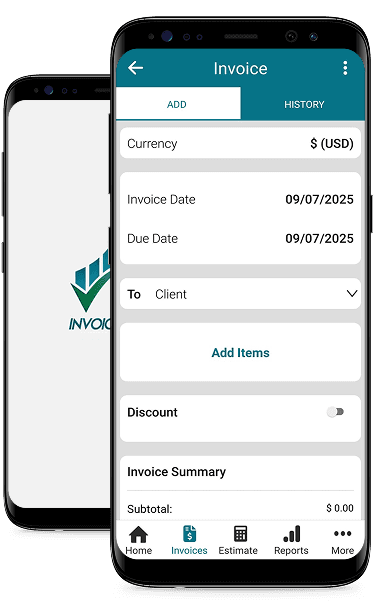
Draft line items, pick currency, and see a live preview while you work—before you save or export.
Web + mobile
InvoiceMe is invoice software for small business and freelancer invoicing—with easy invoicing tools on the web and mobile. Same clients, items, and PDF templates; online billing services from quote to paid.
Regulatory context (geo-based)
Detected country: US. Current regulator: Local Tax Authority.
Country-specific invoicing compliance rules can be enabled based on your business location.
Product
A practical invoice management system: clients, catalog items, multi-currency, backend PDFs, and invoice tracking software after you sign in.
Draft line items, pick currency, and see a live preview while you work—before you save or export.
Generate PDFs from your saved invoices using the same template stack as your API—professional layouts without reformatting every time.
Store clients and reusable items so repeat billing stays fast and consistent.
Choose invoice currency from supported options so totals match how you quote and get paid.
Complete onboarding so your company name, contact details, and logo flow into invoices and PDFs.
After you sign in, see revenue, invoice counts, and status at a glance—simple invoice tracking without spreadsheets.
Workflow
Add your company details once—they power how invoices and PDFs look to clients.
Build a lightweight catalog and client list so creating the next invoice takes minutes.
Use the builder to line up totals, save to your account, and download a PDF—your online billing services workflow end to end.
FAQ
InvoiceMe is invoice software for small business and freelancer invoicing: draft in the builder, use an invoice management system for clients and catalog items when logged in, and download PDFs from custom invoice templates on the server.
You can explore the invoice builder without an account. Saving invoices, syncing clients and items, and downloading PDFs from saved invoices typically require signing in.
Yes. You can select invoice currency from the options provided by the app so amounts display consistently in the preview and saved records.
PDFs are produced server-side (e.g. via your InvoiceMe API) so layouts match your configured templates rather than a separate browser-only renderer.
On paid plans you can connect SMTP and send from your domain—automated invoicing solutions so clients receive invoices and notifications without you forwarding each email manually.